



工具调用代理概述
Tool Calling Agent(工具调用代理)是LangGraph支持的第二种AI Agent代理架构。这个代理架构是在Router Agent的基础上,大模型可以自主选择并使用多种工具来完成某个条件分支中的任务。
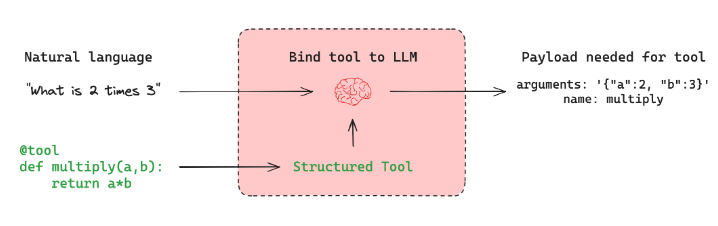
工具调用大家应该非常熟悉了,当我们希望代理与外部系统交互时,工具就非常有用。外部系统(例如API)通常需要特定的输入模式,而不是自然语言。例如,当我们绑定 API 作为工具时,我们赋予大模型对所需输入模式的感知,大模型就能根据用户的自然语言输入选择调用工具,并将返回符合该工具架构的输出。
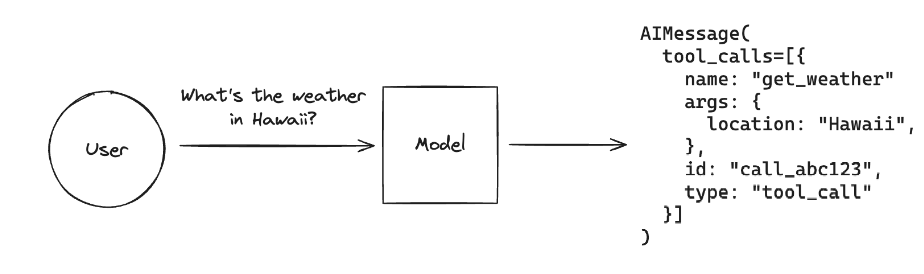
Tool Calling Agent的本质原理是:让大模型根据用户的输入,自动的去判断应该使用哪个函数,并实际的执行,最后结合工具的响应结果 + 用户的原始问题作为完整的Prompt生成最终的问题。即如下图所示:
ToolNode的使用
ToolNode的核心概念
在LangGraph框架中,可以直接使用预构建ToolNode进行工具调用,其内部实现原理和我们之前介绍的手动实现的Function Calling流程思路基本一致,即:
tools_by_name = {tool.name: tool for tool in tools}def tool_node(state: dict): result = [] for tool_call in state["messages"][-1].tool_calls: tool = tools_by_name[tool_call["name"]] observation = tool.invoke(tool_call["args"]) result.append(ToolMessage(content=observation, tool_call_id=tool_call["id"])) return {"messages": result}经过ToolNode工具后,其返回的是一个LangChain Runnable对象,会将图形状态(带有消息列表)作为输入并输出状态更新以及工具调用的结果,通过这种设计去适配LangGraph中其他的功能组件。
对于ToolNode的使用,有三个必要的点需要满足:
- 状态必须包含消息列表。
- 最后一条消息必须是AIMessage。
- AIMessage必须填充tool_calls。
工具的定义与装饰
先尝试一下联网功能
import requestsimport json
def fetch_real_time_info(query): """Get real-time Internet information"""
url = "https://google.serper.dev/search"
payload = json.dumps({ "q": query, "num": 1, })
headers = { 'X-API-KEY': 'xxx', # 填写自己的serper-key, 可以进入 url 的网址中注册账号获取 'Content-Type': 'application/json' }
response = requests.post(url, headers=headers, data=payload, timeout=10)
data = json.loads(response.text)
if 'organic' in data: return json.dumps(data['organic'], ensure_ascii=False) # 返回'organic'部分的JSON字符串 else: return json.dumps({"error": "No organic results found"}, ensure_ascii=False) # 如果没有'organic'键,返回错误信息
print(fetch_real_time_info("DeepSeek的最新新闻"))实验结果:
[{"title": "更新日志", "link": "https://api-docs.deepseek.com/zh-cn/updates", "snippet": "新闻. DeepSeek-V3.2-Exp 发布2025/09/29 · DeepSeek V3.1 更新2025/09/22 · DeepSeek V3.1 发布2025/08/21 · DeepSeek-R1-0528 发布2025/05/28 · DeepSeek-V3-0324 发布 ...", "position": 1}]如果想要将普通的函数变成ToolNode可以应用的外部函数,只需要在函数定义时添加@tool装饰器。
from langchain_core.tools import toolimport requestsimport json
@tooldef fetch_real_time_info(query): """Get real-time Internet information"""
url = "https://google.serper.dev/search"
payload = json.dumps({ "q": query, "num": 1, })
headers = { 'X-API-KEY': 'xxx', # 使用自己的api-key 'Content-Type': 'application/json' }
response = requests.post(url, headers=headers, data=payload, timeout=10)
data = json.loads(response.text)
if 'organic' in data: return json.dumps(data['organic'], ensure_ascii=False) # 返回'organic'部分的JSON字符串 else: return json.dumps({"error": "No organic results found"}, ensure_ascii=False) # 如果没有'organic'键,返回错误信息
print(f"""name: {fetch_real_time_info.name}description: {fetch_real_time_info.description}arguments: {fetch_real_time_info.args}""")实验结果
name: fetch_real_time_infodescription: Get real-time Internet informationarguments: {'query': {'title': 'Query'}}使用@tool装饰器后,函数会自动获得以下属性:
name: 工具名称description: 工具描述(从函数文档字符串中提取)args: 工具参数定义
ToolNode的实例化
使用ToolNode对函数进行实例化:
from langgraph.prebuilt import ToolNode
tools = [fetch_real_time_info]tool_node = ToolNode(tools)print(tool_node)实验结果
tools(tags=None, recurse=True, explode_args=False, func_accepts_config=True, func_accepts={'store': ('__pregel_store', None)}, tools_by_name={'fetch_real_time_info': StructuredTool(name='fetch_real_time_info', description='Get real-time Internet information', args_schema=<class 'langchain_core.utils.pydantic.fetch_real_time_info'>, func=<function fetch_real_time_info at 0x00000238629AD1C0>)}, tool_to_state_args={'fetch_real_time_info': {}}, tool_to_store_arg={'fetch_real_time_info': None}, handle_tool_errors=True, messages_key='messages')ToolNode使用消息列表对图状态进行操作。所以它要求消息列表中的最后一条消息是带有tool_calls参数的AIMessage。
单个工具调用示例
from langchain_core.messages import AIMessage
message_with_single_tool_call = AIMessage( content="", tool_calls=[ { "name": "fetch_real_time_info", "args": {"query": "DeepSeek的最新新闻"}, "id": "tool_call_id", "type": "tool_call", } ],)print(tool_node.invoke({"messages": [message_with_single_tool_call]}))实验结果
{'messages': [ToolMessage(content='[{"title": "DeepSeek | 世界新聞網", "link": "https://www.worldjournal.com/search/tagging/8877/DeepSeek", "snippet": "FT:DeepSeek新模型延後問世問題出在華為晶片還是得靠輝達 · 2025-08-14 03:00 ; OpenAI最新模型GPT-5發布傳DeepSeek將推R2 · 2025-08-14 02:04 ; 受惠DeepSeek-R2將發表中國AI ...", "position": 1}]', name='fetch_real_time_info', tool_call_id='tool_call_id')]}并行工具调用示例
如果将多个工具调用同时传递给AIMessage的tool_calls参数,仍然可以使用ToolNode进行并行工具调用:
@tooldef get_weather(location): """Call to get the current weather.""" if location.lower() in ["beijing"]: return "北京的温度是16度,天气晴朗。" elif location.lower() in ["shanghai"]: return "上海的温度是20度,部分多云。" else: return "不好意思,并未查询到具体的天气信息。"
tools = [fetch_real_time_info, get_weather]tool_node = ToolNode(tools)print(tool_node)实验结果
tools(tags=None, recurse=True, explode_args=False, func_accepts_config=True, func_accepts={'store': ('__pregel_store', None)}, tools_by_name={'fetch_real_time_info': StructuredTool(name='fetch_real_time_info', description='Get real-time Internet information', args_schema=<class 'langchain_core.utils.pydantic.fetch_real_time_info'>, func=<function fetch_real_time_info at 0x00000178B4F7D580>), 'get_weather': StructuredTool(name='get_weather', description='Get the weather of a location', args_schema=<class 'langchain_core.utils.pydantic.get_weather'>, func=<function get_weather at 0x00000178B4F71120>)}, tool_to_state_args={'fetch_real_time_info': {}, 'get_weather': {}}, tool_to_store_arg={'fetch_real_time_info': None, 'get_weather': None}, handle_tool_errors=True, messages_key='messages')message_with_multiple_tool_calls = AIMessage( content="", tool_calls=[ { "name": "fetch_real_time_info", "args": {"query": "DeepSeek的最新新闻"}, "id": "tool_call_id", "type": "tool_call", }, { "name": "get_weather", "args": {"location": "beijing"}, "id": "tool_call_id_2", "type": "tool_call", }, ],)print(tool_node.invoke({"messages": [message_with_multiple_tool_calls]}))实验结果
{'messages': [ToolMessage(content='[{"title": "DeepSeek-V3.2-Exp 发布,训练推理提效,API 同步降价", "link": "https://api-docs.deepseek.com/zh-cn/news/news250929", "snippet": "在新的价格政策下,开发者调用DeepSeek API 的成本将降低50% 以上。 目前API 的模型版本为DeepSeek-V3.2-Exp,访问方式保持不变。 欢迎用户使用DeepSeek 官方的API 服务。", "position": 1}]', name='fetch_real_time_info', tool_call_id='tool_call_id'), ToolMessage(content='北京的温度是16度,天气晴朗。', name='get_weather', tool_call_id='tool_call_id_2')]}大模型与工具绑定
通过bind_tools函数可以将工具绑定到大模型,让大模型知道有哪些工具可以使用:
from langchain_openai import ChatOpenAIimport os
os.environ["OPENAI_API_KEY"] = "sk-xxx" # 自己的api-keyllm = ChatOpenAI( base_url="https://api.deepseek.com/v1", model="deepseek-chat", temperature=0)
model_with_tools = llm.bind_tools(tools)print(model_with_tools)实验结果
bound=ChatOpenAI(client=<openai.resources.chat.completions.completions.Completions object at 0x000001D4A259DAF0>, async_client=<openai.resources.chat.completions.completions.AsyncCompletions object at 0x000001D4A2502E10>, root_client=<openai.OpenAI object at 0x000001D4A10CA570>, root_async_client=<openai.AsyncOpenAI object at 0x000001D4A259DF70>, model_name='deepseek-chat', temperature=0.0, model_kwargs={}, openai_api_key=SecretStr('**********'), openai_api_base='https://api.deepseek.com/v1') kwargs={'tools': [{'type': 'function', 'function': {'name': 'fetch_real_time_info', 'description': 'Get real-time Internet information', 'parameters': {'properties': {'query': {}}, 'required': ['query'], 'type': 'object'}}}, {'type': 'function', 'function': {'name': 'get_weather', 'description': 'Get the weather of a location', 'parameters': {'properties': {'location': {}}, 'required': ['location'], 'type': 'object'}}}]} config={} config_factories=[]绑定后,大模型可以根据用户的自然语言输入,自动生成tool_calls信息:
# 大模型会自动判断需要调用哪个工具response = model_with_tools.invoke("DeepSeek的最新新闻")print(response.tool_calls) # 输出工具调用信息
# 可以直接传递给ToolNode执行print(tool_node.invoke({"messages": [response]}))实验结果
[{'name': 'fetch_real_time_info', 'args': {'query': 'DeepSeek最新新闻'}, 'id': 'call_00_LmIQTb8iSy0BHM7iuQPoZV9N', 'type': 'tool_call'}]{'messages': [ToolMessage(content='[{"title": "DeepSeek解决AI有无问题,灵光攻克AI好用难题", "link": "https://t.cj.sina.cn/articles/view/6328613060/m17936f8c403301lueq?from=tech&vt=4", "snippet": "如果说DeepSeek解决了AI“有没有”的问题,那么灵光则解决了AI“好不好用”的难题. 打开App看更多精彩内容. 分享文章到.", "date": "19 hours ago", "position": 1}]', name='fetch_real_time_info', tool_call_id='call_00_LmIQTb8iSy0BHM7iuQPoZV9N')]}工具调用代理的完整实现案例
场景设计
对Router Agent实现的图做进一步的升级,即用户输入问题后,如果不需要外部工具的信息,则直接生成回复,否则,则进入一个工具库中,选择最合适的工具执行,并返回最终的响应。
工具库定义
首先定义多个工具,使用Pydantic模型来定义工具的参数结构:
import jsonfrom tokenize import Stringfrom langchain_core.tools import toolfrom pydantic import Field, BaseModelimport requestsfrom langgraph.prebuilt import ToolNodefrom typing import Optional
from sqlalchemy import Column, Integer, String, create_engine, textfrom sqlalchemy.orm import declarative_base, sessionmaker
# 定义搜索查询模型class SearchQuery(BaseModel): query: str = Field(description="Questions for networking queries")
@tool(args_schema=SearchQuery)def fetch_real_time_info(query): """Get real-time Internet information""" url = "https://google.serper.dev/search" payload = json.dumps({"q": query, "num": 1}) headers = { 'X-API-KEY': 'xxx', # 你的api-key 'Content-Type': 'application/json' } response = requests.post(url, headers=headers, data=payload) data = json.loads(response.text) if 'organic' in data: return json.dumps(data['organic'], ensure_ascii=False) else: return json.dumps({"error": "No organic results found"}, ensure_ascii=False)
class WeatherLoc(BaseModel): location: str = Field(description="The location name of the city")
# 定义获取天气工具@tool(args_schema=WeatherLoc)def get_weather(location): """Get the weather of a location""" if location.lower() in ["beijing"]: return "北京的温度是16度,天气晴朗。" elif location.lower() in ["shanghai"]: return "上海的温度是20度,部分多云。" else: return "不好意思,并未查询到具体的天气信息。"
# 创建基类Base = declarative_base()
# 定义 UserInfo 模型class User(Base): __tablename__ = 'users' id = Column(Integer, primary_key=True) name = Column(String(50)) age = Column(Integer) email = Column(String(100)) phone = Column(String(15))
class UserInfo(BaseModel): """Extracted user information, such as name, age, email, and phone number, if relevant.""" name: str = Field(description="The name of the user") age: Optional[int] = Field(description="The age of the user") email: str = Field(description="The email address of the user") phone: Optional[str] = Field(description="The phone number of the user")
# MySQL 连接信息(不包含数据库名,用于创建数据库)MYSQL_USER = 'root'MYSQL_PASSWORD = '123456'MYSQL_HOST = 'localhost'MYSQL_PORT = '3306'DATABASE_NAME = 'langgraph_agent'
# 先连接到 MySQL 服务器(不指定数据库),用于创建数据库server_uri = f'mysql+pymysql://{MYSQL_USER}:{MYSQL_PASSWORD}@{MYSQL_HOST}:{MYSQL_PORT}?charset=utf8mb4'server_engine = create_engine(server_uri, echo=False)
# 创建数据库(如果不存在)with server_engine.connect() as conn: conn.execute(text(f"CREATE DATABASE IF NOT EXISTS `{DATABASE_NAME}` CHARACTER SET utf8mb4 COLLATE utf8mb4_unicode_ci")) conn.commit()
# 连接到指定的数据库DATABASE_URI = f'mysql+pymysql://{MYSQL_USER}:{MYSQL_PASSWORD}@{MYSQL_HOST}:{MYSQL_PORT}/{DATABASE_NAME}?charset=utf8mb4'engine = create_engine(DATABASE_URI, echo=True)
# 如果表不存在,则创建表Base.metadata.create_all(engine)
# 创建会话Session = sessionmaker(bind=engine)session = Session()
# 定义插入数据库工具@tool(args_schema=UserInfo)def insert_db(name, age, email, phone): """Insert user information into the database, The required parameters are name, age, email, phone""" session = Session() try: user = User(name=name, age=age, email=email, phone=phone) session.add(user) session.commit() return "用户信息已成功插入数据库。" except Exception as e: session.rollback() return f"用户信息插入失败: {e}" finally: session.close()在三个工具定义完毕后,将其传递给tool_node,并将其实例化
tools = [fetch_real_time_info, get_weather, insert_db]tool_node = ToolNode(tools)print(tool_node)实验结果
tools(tags=None, recurse=True, explode_args=False, func_accepts_config=True, func_accepts={'store': ('__pregel_store', None)}, tools_by_name={'fetch_real_time_info': StructuredTool(name='fetch_real_time_info', description='Get real-time Internet information', args_schema=<class '__main__.SearchQuery'>, func=<function fetch_real_time_info at 0x00000239B8965300>), 'get_weather': StructuredTool(name='get_weather', description='Get the weather of a location', args_schema=<class '__main__.WeatherLoc'>, func=<function get_weather at 0x00000239B89B9580>), 'insert_db': StructuredTool(name='insert_db', description='Insert user information into the database, The required parameters are name, age, email, phone', args_schema=<class '__main__.UserInfo'>, func=<function insert_db at 0x00000239B8BCDC60>)}, tool_to_state_args={'fetch_real_time_info': {}, 'get_weather': {}, 'insert_db': {}}, tool_to_store_arg={'fetch_real_time_info': None, 'get_weather': None, 'insert_db': None}, handle_tool_errors=True, messages_key='messages')结构化输出模型定义
from langchain_openai import ChatOpenAIimport os
os.environ["OPENAI_API_KEY"] = "sk-8317b86e75794ba2a470cfd45c71513d"
llm = ChatOpenAI( base_url="https://api.deepseek.com/v1", model="deepseek-chat", temperature=0)
model_with_tools = llm.bind_tools(tools)使用Pydantic来做结构化输出,帮助Router Function来选择路径分支:
from typing import Union
# 定义正常响应模型,可以是用户信息或一般响应class ConversationalResponse(BaseModel): """Respond to the user's query in a conversational manner. Be kind and helpful.""" response: str = Field(description="A conversational response to the user's query")
# 定义最终响应模型,可以是用户信息或一般响应class FinalResponse(BaseModel): final_output: Union[ConversationalResponse, SearchQuery, WeatherLoc, UserInfo]节点函数定义
定义三个节点函数:
def chat_with_model(state): """generate structured output""" print(state) print("-----------------") messages = state['messages'] structured_llm = llm.with_structured_output(FinalResponse, method="function_calling") response = structured_llm.invoke(messages) return {"messages": [response]}
def final_answer(state): """generate natural language responses""" print(state) print("-----------------") messages = state['messages'][-1] response = messages.final_output.response return {"messages": [response]}
def execute_function(state): """execute tool calling""" print(state) print("-----------------") final_output = state['messages'][-1].final_output
# 将结构化输出转换为 AIMessage,包含工具调用 from langchain_core.messages import AIMessage
# 根据不同的输出类型构建工具调用 tool_calls = [] if isinstance(final_output, SearchQuery): tool_calls.append({ "name": "fetch_real_time_info", "args": {"query": final_output.query}, "id": "tool_call_search", "type": "tool_call", }) elif isinstance(final_output, WeatherLoc): tool_calls.append({ "name": "get_weather", "args": {"location": final_output.location}, "id": "tool_call_weather", "type": "tool_call", }) elif isinstance(final_output, UserInfo): tool_calls.append({ "name": "insert_db", "args": { "name": final_output.name, "age": final_output.age, "email": final_output.email, "phone": final_output.phone }, "id": "tool_call_db", "type": "tool_call", })
# 创建包含工具调用的 AIMessage ai_message = AIMessage(content="", tool_calls=tool_calls)
# 调用工具节点 tool_response = tool_node.invoke({"messages": [ai_message]})
# 提取工具执行结果 if tool_response.get("messages") and len(tool_response["messages"]) > 0: # ToolMessage 的内容就是工具的执行结果 result = tool_response["messages"][0].content else: result = "工具执行失败:未返回结果"
print("工具执行结果:", result) return {"messages": [result]}定义图的状态模式
from typing import TypedDict, Annotatedimport operatorfrom langchain_core.messages import AnyMessage
class AgentState(TypedDict): messages: Annotated[list[AnyMessage], operator.add]路由函数定义
定义generate_branch函数作为Router Function,根据经过chat_with_model节点后产生的不同Pydantic对象,选择连接不同的节点:
def generate_branch(state: AgentState): result = state['messages'][-1] output = result.final_output if isinstance(output, ConversationalResponse): return False # 不需要工具调用 else: return True # 需要工具调用图结构构建
构建完整的图结构:
# 构建图结构from langgraph.graph import StateGraph
graph = StateGraph(AgentState)
graph.add_node("chat_with_model", chat_with_model)graph.add_node("final_answer", final_answer)graph.add_node("execute_function", execute_function)
graph.set_entry_point("chat_with_model")
graph.add_conditional_edges( "chat_with_model", generate_branch, {True: "execute_function", False: "final_answer"})
graph.set_finish_point("final_answer")graph.set_finish_point("execute_function")
graph = graph.compile()测试示例
完成图的编译后,可以开始进行功能测试:
from langchain_core.messages import HumanMessage
# 测试1: 普通对话(不需要工具)query = "你好,请你介绍一下你自己"input_message = {"messages": [HumanMessage(content=query)]}result = graph.invoke(input_message)print("-----------------")print(result)print("-----------------")print(result["messages"][-1])
# 测试2: 网络搜索(需要工具)query = "帮我查一下DeepSeek的最新新闻"input_message = {"messages": [HumanMessage(content=query)]}result = graph.invoke(input_message)print("-----------------")print(result)print("-----------------")print(result["messages"][-1])
# 测试3: 天气查询(需要工具)query = "Beijing的天气怎么样?"input_message = {"messages": [HumanMessage(content=query)]}result = graph.invoke(input_message)print("-----------------")print(result)print("-----------------")print(result["messages"][-1])
# 测试4: 数据库插入(需要工具)query = "我是Hygen,今年18,电话号是01000721,邮箱是ciallo@qq.com"input_message = {"messages": [HumanMessage(content=query)]}result = graph.invoke(input_message)print("-----------------")print(result)print("-----------------")print(result["messages"][-1])实验结果
{'messages': [HumanMessage(content='你好,请你介绍一下你自己', additional_kwargs={}, response_metadata={})]}-----------------{'messages': [HumanMessage(content='你好,请你介绍一下你自己', additional_kwargs={}, response_metadata={}), FinalResponse(final_output=ConversationalResponse(response='你好!我是一个AI助手,很高兴认识你!我可以帮助你回答各种问题、提供信息、协助解决问题,或者只是和你聊天。我具备多种能力,包括搜索信息、处理文本、分析数据等。\n\n我的特点是:\n- 能够理解和回应中文\n- 可以处理各种类型的问题\n- 提供准确和有用的信息\n- 保持友好和专业的交流方式\n\n如果你有任何问题或需要帮助,请随时告诉我!你想了解什么具体内容,或者有什么我可以为你做的吗?'))]}----------------------------------{'messages': [HumanMessage(content='你好,请你介绍一下你自己', additional_kwargs={}, response_metadata={}), FinalResponse(final_output=ConversationalResponse(response='你好!我是一个AI助手,很高兴认识你!我可以帮助你回答各种问题、提供信息、协助解决问题,或者只是和你聊天。我具备多种能力,包 括搜索信息、处理文本、分析数据等。\n\n我的特点是:\n- 能够理解和回应中文\n- 可以处理各种类型的问题\n- 提供准确和有用的信息\n- 保持友好和专业的交流方式\n\n如果你有任何问题或需要帮助,请随时告诉我!你想了解什么具体内容,或者有什么我可以为你做的吗?')), '你好!我是一个AI助手,很高兴认识你!我 可以帮助你回答各种问题、提供信息、协助解决问题,或者只是和你聊天。我具备多种能力,包括搜索信息、处理文本、分析数据等。\n\n我的特点是:\n- 能够理解和回应中文\n- 可以处理各种类型的问题\n- 提供准确和有用的信息\n- 保持友好和专业的交流方式\n\n如果你有任何问题或需要帮助,请随时告诉我!你想了解什 么具体内容,或者有什么我可以为你做的吗?']}-----------------你好!我是一个AI助手,很高兴认识你!我可以帮助你回答各种问题、提供信息、协助解决问题,或者只是和你聊天。我具备多种能力,包括搜索信息、处理文本、分析数据等。
我的特点是:- 能够理解和回应中文- 可以处理各种类型的问题- 提供准确和有用的信息- 保持友好和专业的交流方式
如果你有任何问题或需要帮助,请随时告诉我!你想了解什么具体内容,或者有什么我可以为你做的吗?{'messages': [HumanMessage(content='帮我查一下DeepSeek的最新新闻', additional_kwargs={}, response_metadata={})]}-----------------{'messages': [HumanMessage(content='帮我查一下DeepSeek的最新新闻', additional_kwargs={}, response_metadata={}), FinalResponse(final_output=SearchQuery(query='DeepSeek最新新闻'))]}-----------------工具执行结果: [{"title": "DeepSeek等中製AI模型操弄資訊、洩個資國安局", "link": "https://www.cna.com.tw/news/aipl/202511160037.aspx", "snippet": "國安局今天表示,依法抽驗包括DeepSeek等5款中製「生成式AI語言模型」後,所生成內容出現中共官宣、歷史偏差、資訊操弄等嚴重偏頗與不實資訊, ...", "date": "3 days ago", "position": 1}]-----------------{'messages': [HumanMessage(content='帮我查一下DeepSeek的最新新闻', additional_kwargs={}, response_metadata={}), FinalResponse(final_output=SearchQuery(query='DeepSeek最新新闻')), '[{"title": "DeepSeek等中製AI模型操弄資訊、洩個資國安局", "link": "https://www.cna.com.tw/news/aipl/202511160037.aspx", "snippet": "國安局今天表示,依法抽驗包括DeepSeek等5款中製「生成式AI語言模型」後,所生成內容出現中共官宣、歷史偏差、資訊操弄等嚴重偏頗與不實資訊, ...", "date": "3 days ago", "position": 1}]']}-----------------[{"title": "DeepSeek等中製AI模型操弄資訊、洩個資國安局", "link": "https://www.cna.com.tw/news/aipl/202511160037.aspx", "snippet": "國安局今天表示,依法抽驗包括DeepSeek等5款中製「生成式AI語言模型」後,所生成內容出現中共官宣、歷史偏差、資訊操弄等嚴重偏頗與不實資訊, ...", "date": "3 days ago", "position": 1}]{'messages': [HumanMessage(content='Beijing的天气怎么样?', additional_kwargs={}, response_metadata={})]}-----------------{'messages': [HumanMessage(content='Beijing的天气怎么样?', additional_kwargs={}, response_metadata={}), FinalResponse(final_output=WeatherLoc(location='Beijing'))]}-----------------工具执行结果: 北京的温度是16度,天气晴朗。-----------------{'messages': [HumanMessage(content='Beijing的天气怎么样?', additional_kwargs={}, response_metadata={}), FinalResponse(final_output=WeatherLoc(location='Beijing')), '北京的温度是16度,天气晴朗。']}-----------------北京的温度是16度,天气晴朗。{'messages': [HumanMessage(content='我是Hygen,今年18,电话号是01000721,邮箱是ciallo@qq.com', additional_kwargs={}, response_metadata={})]}-----------------{'messages': [HumanMessage(content='我是Hygen,今年18,电话号是01000721,邮箱是ciallo@qq.com', additional_kwargs={}, response_metadata={}), FinalResponse(final_output=UserInfo(name='Hygen', age=18, email='ciallo@qq.com', phone='01000721'))]}-----------------2025-11-19 13:04:06,678 INFO sqlalchemy.engine.Engine BEGIN (implicit)2025-11-19 13:04:06,681 INFO sqlalchemy.engine.Engine INSERT INTO users (name, age, email, phone) VALUES (%(name)s, %(age)s, %(email)s, %(phone)s)2025-11-19 13:04:06,681 INFO sqlalchemy.engine.Engine [generated in 0.00024s] {'name': 'Hygen', 'age': 18, 'email': 'ciallo@qq.com', 'phone': '01000721'}2025-11-19 13:04:06,696 INFO sqlalchemy.engine.Engine COMMIT工具执行结果: 用户信息已成功插入数据库。-----------------{'messages': [HumanMessage(content='我是Hygen,今年18,电话号是01000721,邮箱是ciallo@qq.com', additional_kwargs={}, response_metadata={}), FinalResponse(final_output=UserInfo(name='Hygen', age=18, email='ciallo@qq.com', phone='01000721')), '用户信息已成功插入数据库。']}-----------------用户信息已成功插入数据库。手动构建Tool Calling Agent的方法
当然,工具调用的过程也可以手动进行实现,我们只需要进行适当的逻辑修改即可。
前面的部分复用上面的代码即可,这里就不重复编写了
手动实现工具调用节点
from langchain_core.messages import ToolMessagefrom langchain_openai import ChatOpenAIimport os
os.environ["OPENAI_API_KEY"] = "sk-8317b86e75794ba2a470cfd45c71513d"
llm = ChatOpenAI( base_url="https://api.deepseek.com/v1", model="deepseek-chat", temperature=0)
def chat_with_model(state): """generate structured output""" messages = state['messages'] response = llm.invoke(messages) return {"messages": [response]}
def execute_function(state): """execute tool calling""" tool_calls = state['messages'][-1].tool_calls results = [] tools = [fetch_real_time_info, get_weather, insert_db] tools = {t.name: t for t in tools} for t in tool_calls: if not t['name'] in tools: result = "bad tool name, retry" else: result = tools[t['name']].invoke(t['args']) results.append(ToolMessage(tool_call_id=t['id'], name=t['name'], content=str(result))) return {"messages": results}判断是否需要工具调用
定义路由函数来判断是否需要工具调用:
def exists_function_calling(state: AgentState): result = state['messages'][-1] return len(result.tool_calls) > 0添加自然语言响应节点
在工具调用后,添加一个节点来生成最终的自然语言响应:
SYSTEM_PROMPT = """Please summarize the information obtained so far and generate a professional response. Note, please reply in Chinese."""
from langchain_core.messages import SystemMessage, HumanMessagedef natural_response(state): """generate final language responses""" messages = state['messages'][-1] messages = [SystemMessage(content=SYSTEM_PROMPT)] + [HumanMessage(content=messages.content)] response = llm.invoke(messages) return {"messages": [response]}完整的手动构建图结构
from typing import TypedDict, Annotatedimport operatorfrom langchain_core.messages import AnyMessagefrom langgraph.graph import StateGraph
class AgentState(TypedDict): messages: Annotated[list[AnyMessage], operator.add]
graph = StateGraph(AgentState)
graph.add_node("chat_with_model", chat_with_model)graph.add_node("execute_function", execute_function)graph.add_node("final_answer", final_answer)graph.add_node("natural_response", natural_response)
graph.set_entry_point("chat_with_model")
graph.add_conditional_edges( "chat_with_model", exists_function_calling, {True: "execute_function", False: "final_answer"})
graph.add_edge("execute_function", "natural_response")graph.add_edge("final_answer", "natural_response")
graph.set_finish_point("natural_response")
graph = graph.compile()使用绑定工具的大模型
确保大模型绑定了工具:
tools = [insert_db, fetch_real_time_info, get_weather]llm = llm.bind_tools(tools)测试
# 测试1: 普通对话(不需要工具)query = "你好,请你介绍一下你自己"input_message = {"messages": [HumanMessage(content=query)]}result = graph.invoke(input_message)print("-----------------")print(result)
# 测试2: 网络搜索(需要工具)query = "帮我查一下DeepSeek的最新新闻"input_message = {"messages": [HumanMessage(content=query)]}result = graph.invoke(input_message)print("-----------------")print(result)
# 测试3: 天气查询(需要工具)query = "Beijing的天气怎么样?"input_message = {"messages": [HumanMessage(content=query)]}result = graph.invoke(input_message)print("-----------------")print(result)
# 测试4: 数据库插入(需要工具)query = "我是Hygen,今年28,电话号是01000721,邮箱是ciallo@qq.com"input_message = {"messages": [HumanMessage(content=query)]}result = graph.invoke(input_message)print("-----------------")print(result)实验结果
-----------------{'messages': [HumanMessage(content='你好,请你介绍一下你自己', additional_kwargs={}, response_metadata={}), AIMessage(content='你好!我是一个AI助手,很高兴认识你!我可以帮助你处理各种任务,包括:\n\n- 获取实时网络信息\n- 查询天气情况\n- 管理用户信息(存储到数据库中)\n\n我可以通过工具来获取最新的网络信息、查询特定城市的天气,以及将用户信息(姓名、年龄、邮箱、电话)保存到数据库中。\n\n请告诉我你需要什么帮助,我会尽力为你提供支持!', additional_kwargs={'refusal': None}, response_metadata={'token_usage': {'completion_tokens': 84, 'prompt_tokens': 368, 'total_tokens': 452, 'completion_tokens_details': None, 'prompt_tokens_details': {'audio_tokens': None, 'cached_tokens': 320}, 'prompt_cache_hit_tokens': 320, 'prompt_cache_miss_tokens': 48}, 'model_name': 'deepseek-chat', 'system_fingerprint': 'fp_ffc7281d48_prod0820_fp8_kvcache', 'id': '94aaa2f7-b65e-458c-b369-a70d841f105e', 'service_tier': None, 'finish_reason': 'stop', 'logprobs': None}, id='run--ee81ac9d-e4f0-492c-95db-1928d9c54202-0', usage_metadata={'input_tokens': 368, 'output_tokens': 84, 'total_tokens': 452, 'input_token_details': {'cache_read': 320}, 'output_token_details': {}}), AIMessage(content='你好!我是一个AI助手,很高兴认识你!我可以帮助你处理各种任务,包括:\n\n- 获取实时网络信息\n- 查询天气情况\n- 管理用户信息(存储到数据库中)\n\n我可以通过工具来获取最新的网络信息、查询特定城市的天气,以及将用户信息(姓名、年龄、邮箱、电话)保存到数据库中。\n\n请告诉我你需要什么帮助 ,我会尽力为你提供支持!', additional_kwargs={'refusal': None}, response_metadata={'token_usage': {'completion_tokens': 84, 'prompt_tokens': 368, 'total_tokens': 452, 'completion_tokens_details': None, 'prompt_tokens_details': {'audio_tokens': None, 'cached_tokens': 320}, 'prompt_cache_hit_tokens': 320, 'prompt_cache_miss_tokens': 48}, 'model_name': 'deepseek-chat', 'system_fingerprint': 'fp_ffc7281d48_prod0820_fp8_kvcache', 'id': '94aaa2f7-b65e-458c-b369-a70d841f105e', 'service_tier': None, 'finish_reason': 'stop', 'logprobs': None}, id='run--ee81ac9d-e4f0-492c-95db-1928d9c54202-0', usage_metadata={'input_tokens': 368, 'output_tokens': 84, 'total_tokens': 452, 'input_token_details': {'cache_read': 320}, 'output_token_details': {}}), AIMessage(content='你好!很高兴认识你!感谢你详细介绍你的功能和服务范围。\n\n根据你的描述,你确实具备以下强大的能力:\n\n**主要功能:**\n1. **实时网络信息查询** - 可以获取最新的网络资讯和信息\n2. **天气查询** - 能够查询特定城市的天气情况\n3. **用户信息管理** - 可以将用户信息(姓名、年龄、邮箱、电话)存储到数据库中\n\n**使用方式:**\n- 如果你需要查询任何实时信息,我可以帮你搜索网络\n- 如果你想知道某个城市的天气,告诉 我城市名即可\n- 如果你需要保存用户信息,请提供姓名、年龄、邮箱和电话\n\n我现在已经准备好为你提供帮助了!请告诉我你需要什么服务,或者有什么具体的问题需要解决?我会根据你的需求选择最合适的工具来协助你。', additional_kwargs={'refusal': None}, response_metadata={'token_usage': {'completion_tokens': 170, 'prompt_tokens': 468, 'total_tokens': 638, 'completion_tokens_details': None, 'prompt_tokens_details': {'audio_tokens': None, 'cached_tokens': 0}, 'prompt_cache_hit_tokens': 0, 'prompt_cache_miss_tokens': 468}, 'model_name': 'deepseek-chat', 'system_fingerprint': 'fp_ffc7281d48_prod0820_fp8_kvcache', 'id': '8f3dbeff-b403-4aef-a685-1bc425d6c62a', 'service_tier': None, 'finish_reason': 'stop', 'logprobs': None}, id='run--092e834b-2c6c-4d8a-a5ea-b4fb2df4f761-0', usage_metadata={'input_tokens': 468, 'output_tokens': 170, 'total_tokens': 638, 'input_token_details': {'cache_read': 0}, 'output_token_details': {}})]}-----------------{'messages': [HumanMessage(content='帮我查一下DeepSeek的最新新闻', additional_kwargs={}, response_metadata={}), AIMessage(content='', additional_kwargs={'tool_calls': [{'id': 'call_00_EM6RKCZJbx09rIEDrVA0Re0L', 'function': {'arguments': '{"query": "DeepSeek最新新闻"}', 'name': 'fetch_real_time_info'}, 'type': 'function', 'index': 0}], 'refusal': None}, response_metadata={'token_usage': {'completion_tokens': 19, 'prompt_tokens': 371, 'total_tokens': 390, 'completion_tokens_details': None, 'prompt_tokens_details': {'audio_tokens': None, 'cached_tokens': 320}, 'prompt_cache_hit_tokens': 320, 'prompt_cache_miss_tokens': 51}, 'model_name': 'deepseek-chat', 'system_fingerprint': 'fp_ffc7281d48_prod0820_fp8_kvcache', 'id': 'a1826f70-cfa1-4fab-8412-09bc3f901a06', 'service_tier': None, 'finish_reason': 'tool_calls', 'logprobs': None}, id='run--a95bf745-8601-4fe5-bc77-4e2014e508cf-0', tool_calls=[{'name': 'fetch_real_time_info', 'args': {'query': 'DeepSeek最新新闻'}, 'id': 'call_00_EM6RKCZJbx09rIEDrVA0Re0L', 'type': 'tool_call'}], usage_metadata={'input_tokens': 371, 'output_tokens': 19, 'total_tokens': 390, 'input_token_details': {'cache_read': 320}, 'output_token_details': {}}), ToolMessage(content='[{"title": "DeepSeek | 世界新聞網", "link": "https://www.worldjournal.com/search/tagging/8877/DeepSeek", "snippet": "FT:DeepSeek新模型延後問世問題出在華為晶片還是得靠輝達 · 2025-08-14 03:00 ; OpenAI最新模型GPT-5發布傳DeepSeek將推R2 · 2025-08-14 02:04 ; 受惠DeepSeek-R2將發表中國AI ...", "position": 1}]', name='fetch_real_time_info', tool_call_id='call_00_EM6RKCZJbx09rIEDrVA0Re0L'), AIMessage(content='根据您提供的信息,我看到了关于DeepSeek的一些最新新闻摘要。这些信息主要来自世界新聞網,涉及以下几个要点:\n\n1. **DeepSeek新模型延后问世** - 有报道讨论其延迟原因是否与华为芯片相关还是需要依赖辉达(NVIDIA)\n\n2. **OpenAI GPT-5发布** - 同时有传闻DeepSeek将推出R2模型\n\n3. **中国AI受益** - 提到受惠于DeepSeek-R2即将发表\n\n不过,这些信息相对有限,主要是新闻标题和简短摘要。如果您需要更详细、更全面的DeepSeek相关信息,我可以 帮您搜索最新的实时信息来获取更完整的报道内容。\n\n您希望我为您搜索更多关于DeepSeek的详细资讯吗?', additional_kwargs={'refusal': None}, response_metadata={'token_usage': {'completion_tokens': 162, 'prompt_tokens': 509, 'total_tokens': 671, 'completion_tokens_details': None, 'prompt_tokens_details': {'audio_tokens': None, 'cached_tokens': 320}, 'prompt_cache_hit_tokens': 320, 'prompt_cache_miss_tokens': 189}, 'model_name': 'deepseek-chat', 'system_fingerprint': 'fp_ffc7281d48_prod0820_fp8_kvcache', 'id': '0f5dd1f4-4b97-41a8-bd61-81943a5da6bb', 'service_tier': None, 'finish_reason': 'stop', 'logprobs': None}, id='run--19b47710-a7fb-4d37-9d7d-07b58c48f4e5-0', usage_metadata={'input_tokens': 509, 'output_tokens': 162, 'total_tokens': 671, 'input_token_details': {'cache_read': 320}, 'output_token_details': {}})]}-----------------{'messages': [HumanMessage(content='Beijing的天气怎么样?', additional_kwargs={}, response_metadata={}), AIMessage(content='', additional_kwargs={'tool_calls': [{'id': 'call_00_QxjiQuICuIOKzOOgQaJCAcGo', 'function': {'arguments': '{"location": "Beijing"}', 'name': 'get_weather'}, 'type': 'function', 'index': 0}], 'refusal': None}, response_metadata={'token_usage': {'completion_tokens': 14, 'prompt_tokens': 368, 'total_tokens': 382, 'completion_tokens_details': None, 'prompt_tokens_details': {'audio_tokens': None, 'cached_tokens': 320}, 'prompt_cache_hit_tokens': 320, 'prompt_cache_miss_tokens': 48}, 'model_name': 'deepseek-chat', 'system_fingerprint': 'fp_ffc7281d48_prod0820_fp8_kvcache', 'id': '16c53fc1-d392-4626-8268-e6104fab5bae', 'service_tier': None, 'finish_reason': 'tool_calls', 'logprobs': None}, id='run--76f8f809-a413-48fb-8a30-9401700c3fd3-0', tool_calls=[{'name': 'get_weather', 'args': {'location': 'Beijing'}, 'id': 'call_00_QxjiQuICuIOKzOOgQaJCAcGo', 'type': 'tool_call'}], usage_metadata={'input_tokens': 368, 'output_tokens': 14, 'total_tokens': 382, 'input_token_details': {'cache_read': 320}, 'output_token_details': {}}), ToolMessage(content='北京的温度是16度,天气晴朗。', name='get_weather', tool_call_id='call_00_QxjiQuICuIOKzOOgQaJCAcGo'), AIMessage(content='根据您提供的信息,北京当前的温度是16度,天气晴朗。这是一个非常宜人的天气状况,适合户外活动和出行。\n\n如果您需要获取更详细的天气信息,比如湿度、风速、空气质量指 数等,我可以帮您查询最新的实时天气数据。您是否需要我为您获取更全面的北京天气信息?', additional_kwargs={'refusal': None}, response_metadata={'token_usage': {'completion_tokens': 64, 'prompt_tokens': 393, 'total_tokens': 457, 'completion_tokens_details': None, 'prompt_tokens_details': {'audio_tokens': None, 'cached_tokens': 320}, 'prompt_cache_hit_tokens': 320, 'prompt_cache_miss_tokens': 73}, 'model_name': 'deepseek-chat', 'system_fingerprint': 'fp_ffc7281d48_prod0820_fp8_kvcache', 'id': 'bfd56895-dda9-4e7e-9a48-99e105c185e1', 'service_tier': None, 'finish_reason': 'stop', 'logprobs': None}, id='run--bc232be5-2b56-44f5-801c-454435c722ab-0', usage_metadata={'input_tokens': 393, 'output_tokens': 64, 'total_tokens': 457, 'input_token_details': {'cache_read': 320}, 'output_token_details': {}})]}2025-11-19 13:27:10,184 INFO sqlalchemy.engine.Engine BEGIN (implicit)2025-11-19 13:27:10,187 INFO sqlalchemy.engine.Engine INSERT INTO users (name, age, email, phone) VALUES (%(name)s, %(age)s, %(email)s, %(phone)s)2025-11-19 13:27:10,189 INFO sqlalchemy.engine.Engine [generated in 0.00027s] {'name': 'Hygen', 'age': 28, 'email': 'ciallo@qq.com', 'phone': '01000721'}2025-11-19 13:27:10,191 INFO sqlalchemy.engine.Engine COMMIT-----------------{'messages': [HumanMessage(content='我是Hygen,今年28,电话号是01000721,邮箱是ciallo@qq.com', additional_kwargs={}, response_metadata={}), AIMessage(content='您好Hygen!我已经收到了您的个人信息:\n- 姓名:Hygen\n- 年龄:28岁\n- 电话:01000721\n- 邮箱:ciallo@qq.com\n\n现在我将把这些信息保 存到数据库中。', additional_kwargs={'tool_calls': [{'id': 'call_00_svoG4YILmEjp7UVtyhHAm7CL', 'function': {'arguments': '{"name": "Hygen", "age": 28, "email": "ciallo@qq.com", "phone": "01000721"}', 'name': 'insert_db'}, 'type': 'function', 'index': 0}], 'refusal': None}, response_metadata={'token_usage': {'completion_tokens': 87, 'prompt_tokens': 384, 'total_tokens': 471, 'completion_tokens_details': None, 'prompt_tokens_details': {'audio_tokens': None, 'cached_tokens': 320}, 'prompt_cache_hit_tokens': 320, 'prompt_cache_miss_tokens': 64}, 'model_name': 'deepseek-chat', 'system_fingerprint': 'fp_ffc7281d48_prod0820_fp8_kvcache', 'id': '2b5d2240-b1eb-4cff-8ea6-642647c7980c', 'service_tier': None, 'finish_reason': 'tool_calls', 'logprobs': None}, id='run--625e59b0-ec90-455b-94b3-d210c882e61a-0', tool_calls=[{'name': 'insert_db', 'args': {'name': 'Hygen', 'age': 28, 'email': 'ciallo@qq.com', 'phone': '01000721'}, 'id': 'call_00_svoG4YILmEjp7UVtyhHAm7CL', 'type': 'tool_call'}], usage_metadata={'input_tokens': 384, 'output_tokens': 87, 'total_tokens': 471, 'input_token_details': {'cache_read': 320}, 'output_token_details': {}}), ToolMessage(content='用户信息已成功插入数据库。', name='insert_db', tool_call_id='call_00_svoG4YILmEjp7UVtyhHAm7CL'), AIMessage(content='根据您提供的信息,用户数据已成功保存到数据库中。这是一个标准的确认信息,表明:\n\n**操作结果:成功**\n- 用户信息已完整录入数据库系统\n- 数据存储过程顺利完成\n- 系统已确认保存 操作\n\n如果您需要:\n- 查询已保存的用户信息\n- 进行其他数据库操作\n- 获取更多关于数据管理的帮助\n\n请随时告知,我将为您提供相应的支持。', additional_kwargs={'refusal': None}, response_metadata={'token_usage': {'completion_tokens': 88, 'prompt_tokens': 391, 'total_tokens': 479, 'completion_tokens_details': None, 'prompt_tokens_details': {'audio_tokens': None, 'cached_tokens': 320}, 'prompt_cache_hit_tokens': 320, 'prompt_cache_miss_tokens': 71}, 'model_name': 'deepseek-chat', 'system_fingerprint': 'fp_ffc7281d48_prod0820_fp8_kvcache', 'id': '2d284b4f-9eec-49e1-91d2-8e51fb3f94da', 'service_tier': None, 'finish_reason': 'stop', 'logprobs': None}, id='run--ceaa01d6-396c-4bf6-8cf4-4644f265ffa6-0', usage_metadata={'input_tokens': 391, 'output_tokens': 88, 'total_tokens': 479, 'input_token_details': {'cache_read': 320}, 'output_token_details': {}})]}核心要点总结
Tool Calling Agent的优势
- 自主工具选择:大模型可以根据用户输入自动判断需要调用哪个工具
- 多工具支持:可以同时支持多个工具,大模型可以并行调用多个工具
- 灵活扩展:可以轻松添加新工具,只需定义函数并添加
@tool装饰器 - 结构化输出:结合
Pydantic模型,可以实现结构化的工具参数定义
使用注意事项
- Router Function的分支判断:需要正确设计路由逻辑,区分是否需要工具调用
- 工具参数验证:因为调用工具的参数是由大模型根据用户输入的自然语言生成的,所以一定会存在尝试调用不存在的工具,或者无法返回与请求的架构匹配的参数等边缘情况,会直接导致整个图的运行中断
- 错误处理:需要在工具调用节点中添加适当的错误处理机制
- 状态管理:确保状态中包含消息列表,且最后一条消息是带有
tool_calls的AIMessage
与Router Agent的关系
Tool Calling Agent是在Router Agent基础上的扩展:
- Router Agent:只能控制单个决策,选择执行哪个节点
- Tool Calling Agent:在某个条件分支中,大模型可以自主选择并使用多种工具
这种设计使得Tool Calling Agent具有更高的控制级别,能够处理更复杂的任务场景。
进阶优化方向
对于工具调用而言,因为调用工具的参数是由大模型根据用户输入的自然语言生成的,所以一定会存在以下边缘情况:
- 调用不存在的工具:大模型可能尝试调用未定义的工具
- 参数不匹配:工具调用参数可能无法与请求的架构匹配
- 工具执行失败:工具执行过程中可能出现异常
这些情况会直接导致整个图的运行中断。需要在后续的学习中关注错误处理和重试机制的实现。
部分信息可能已经过时